On a client project we needed a bottom sheet that could do two things really well: either sit as a fixed “preview” bar at the bottom (like a now-playing strip) that the user could tap or drag to expand into a full panel, or stay hidden until we opened it programmatically — no teaser, just a modal-style sheet. We also needed full control over the preview, the handle, the overlay, and the animation so it matched their design system.
The existing options were either too opinionated, too heavy, or didn’t support that “preview bar” pattern cleanly. So we built react-native-expandable-bottom-sheet: performant, gesture-driven, and fully customizable. Then we published it to npm so the rest of the community could use it.
What It Does
The component supports two modes out of the box:
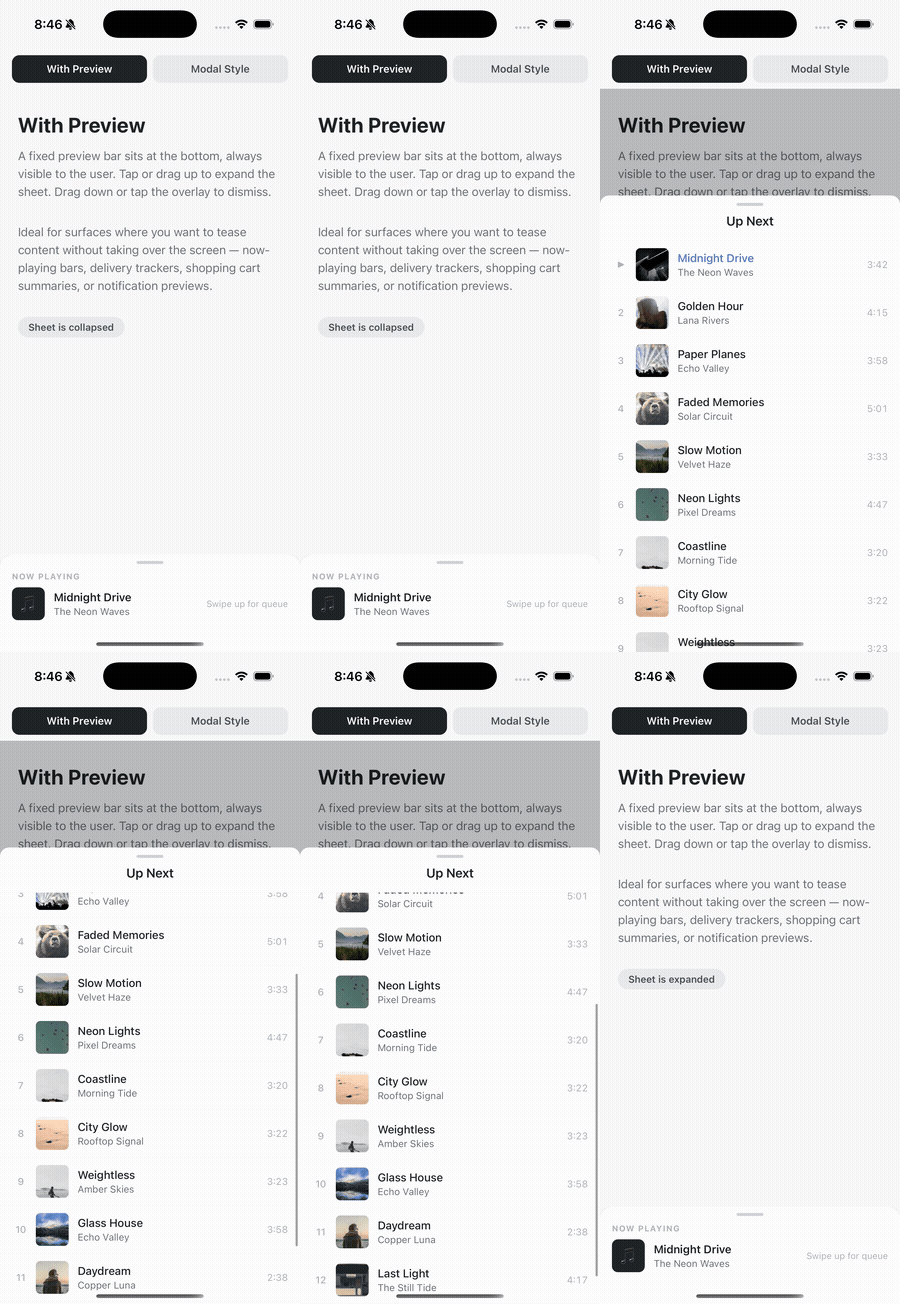
With a preview — A fixed bar sits at the bottom (e.g. “Now Playing” with song title and artist). It doesn’t scroll or expand on its own. When the user taps or drags up, a separate panel slides up over the preview and the rest of the screen, with a dimmed overlay. Dismiss by tapping the overlay, the handle, or dragging down. Ideal for now-playing bars, delivery trackers, shopping cart summaries, or notification previews.
Without a preview (modal-style) — Nothing is visible until you open the sheet (e.g. via a button and ref.expand()). The sheet then appears from the bottom like a modal. Good for comment threads, filters, or any “open on demand” UI.
Under the hood it uses react-native-reanimated and react-native-gesture-handler, works with both the old and new React Native architecture, and exposes props for collapsed height, expanded height (as a fraction of screen), overlay color and opacity, animation duration, drag thresholds, and callbacks. You supply renderPreview, renderHeader, and the scrollable children — the rest is handled for you.
Demo: “With Preview” in Action
Below is a quick demo of the preview-bar mode: a “Now Playing” strip at the bottom that stays visible, with tap or swipe up expanding the sheet to show the full queue. Drag down or tap the overlay to collapse.
Try It
Install from npm:
You’ll need React 18+, React Native 0.72+, and the usual peer deps: react-native-reanimated and react-native-gesture-handler. After adding the package, do a full native rebuild (iOS pod install, then run). Full docs, props, and a runnable example are on the npm page and the GitHub repo.
We built it for a client who needed full control. If you’re building something that needs the same — custom UI, preview bar or not, Reanimated + Gesture Handler — it’s there for you. MIT license. Issues and PRs welcome.